Accounting
Configuration of the chart of accounts
The first step is to configure the chart of accounts suitable for Belgian legislation.
Odoo automatically integrates the Belgian tax localisation with :
- Class 4 accounts (third parties: customers and suppliers)
- Class 6 accounts (expenses)
- Class 7 accounts (income)
- The journals: Sales, Purchases, Bank, Cash
- The taxes: VAT 21% and VAT 6%
This basic configuration allows for immediate accounting entry without complex manual setup.


and operational from the start
01 Dashboard

Overview of the Odoo Accounting module: customer invoices, supplier invoices and centralised bank journals in one dashboard. Deadlines and balances are visible in real time.
02 Chart of accounts
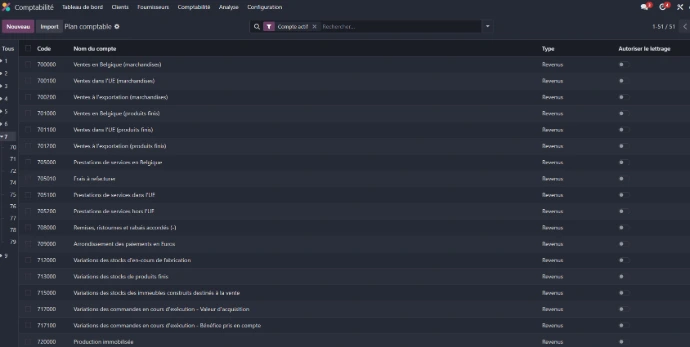
Belgian chart of accounts configured in Odoo with the accounts of class 7 (products and income). Odoo automatically integrates the Belgian tax localisation upon installation.
03 The journals

Configuration of accounting journals: sales, purchases, bank, cash and miscellaneous operations. Each journal is linked to its default accounting account for quick and reliable entry.
04 The taxes

Configuration of Belgian taxes: VAT 21%, 12% and 6% for sales and purchases, with a distinction between goods and services. The Belgian location also includes the intra-community taxes 0% EU.
Supplier invoice and accounting entries
Creation of a supplier invoice for Bruneau (office supplies) for an amount of 375.00€ excluding VAT.
Odoo automatically generates the accounting entries:
- 601000 Purchases of supplies → 375.00€ (Debit)
- 411000 VAT to recover 21% → 78.75€ (Debit)
- 440000 Suppliers → 453.75€ (Credit) The total Debit = Credit (453.75€)
confirms the accounting balance. The supplier reference BRU-2026-04521 is traced across all entries for complete tracking.

From entry to accounting — the complete cycle of a supplier invoice in Odoo.
01 Entry of the invoice

Creation of the Bruneau invoice with automatic generation of accounting entries in draft status
02 Accounting
Odoo automatically generates the 3 accounting entries: expenses, VAT to recover and supplier account
03 Invoice validated

After payment confirmation, Odoo automatically switches the invoice to "In payment" status with the total including tax
04Recording

Selection of the payment journal (Bank, VISA or Cash) and validation with one click from the invoice
Bank reconciliation
Bank reconciliation allows you to match the transactions from the bank statement with the existing accounting entries.
Odoo automatically identifies the Bruneau invoice BRU-2026-04521 thanks to the payment reference and the amount of €453.75.
Result: the bank transaction is matched with the supplier invoice and account 440000 Suppliers is settled.
The reconciliation is validated

Training & Certifications
Recognised accounting skills, complemented by practical mastery of Odoo
CQ6 – Certificate of Qualification in Accounting Issued by PROMSOC in Mons
Certified accounting technician by the Social Promotion Education of the Province of Hainaut. . Academic year 2023/2025.

Odoo Academy – Accounting
Official Odoo Academy training on the Accounting module, taught by Grégory Bellemont, Finance Consultant at Odoo S.A. Completed in April 2026.

Odoo functional support - Invoicing & basic accounting
Thanks to my CQ6 in accounting and my practice of Odoo, I offer functional support on the Invoicing and Accounting modules for simple and structured needs.
01

Creation and testing of customer and supplier invoices
02

Verification of amounts excluding VAT, VAT and including VAT
03

Control of simple taxes
04

Verification of accounting entries generated by Odoo
05

Process tests: quote -> order -> invoice -> payment
06

Preparation of mini user documentation and screenshots
I do not intervene as an accountant, but as Odoo functional support for invoicing, basic accounting tests and user support.